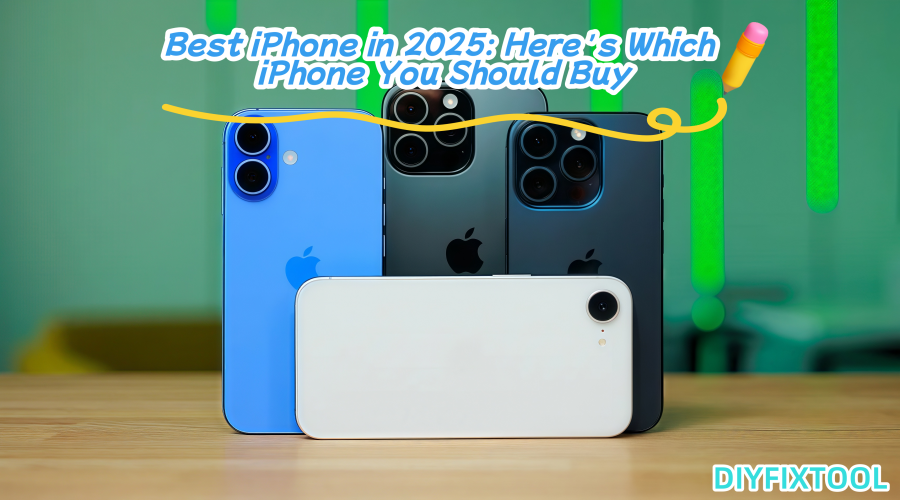
With Apple's 2025 release of the iPhone 17 series, which includes the regular iPhone 17, the incredibly thin iPhone Air, and the high-end iPhone 17 Pro and Pro Max, customers now have more options than ever before. Which is the best, then? To assist you make the best choice, Phonefix breaks down the market from several angles and outlines the important procedures and safety measures involved in the repair process below.

I. Overall Features of the iPhone 17 Series
Before a detailed comparison, let's first discuss the common or significant improvements across the entire series:
1. Chipset and System
The iPhone 17 series is equipped with the latest A19 chip(and A19 Pro for the Pro models) processor, delivering significant performance improvements, especially in graphics processing, multitasking, and AI-powered features. On the system side, it runs iOS 26 and includes Apple Intelligence and Smart Mode (Adaptive Power), which offer upgrades to battery management, system efficiency, and user interaction.
2. Screen and Display Technology
The Pro series retains and enhances the 120Hz ProMotion high refresh rate display, and the standard model also sees significant improvements. Overall brightness, color performance, contrast, and sunlight readability have all been improved.
3. Camera/Video System
The Pro and Pro Max models feature a triple-camera setup (main, ultra-wide-angle, and telephoto), with improvements to the main and telephoto cameras. While the standard and Air models have simplified lens configurations, the iPhone Front Camera Parts has also been upgraded, resulting in improved performance in nighttime, low-light, and high-zoom scenes.

4. Battery and Battery Life
The battery capacity has increased compared to the previous generation (especially in the Pro and Pro Max models). Despite its thinness, the iPhone Air offers decent battery life under light to moderate use. New intelligent power-saving features such as Adaptive Power mode in the new system help extend battery life.
5. Durability and Design
A more scratch-resistant panel, an improved iPhone Back Cover Glass, and optimized internal heat dissipation reduce damage and overheating. The design includes a thin and light model (Air) and the Pro series, which emphasizes feel and material.
II. Model Comparison and Suitable Customers
The following compares each iPhone 17 series model (standard, Air, Pro, and Pro Max), identifying its strengths and weaknesses and suggesting suitable buyers.
1. iPhone 17 Pro Max
Pros:
· Largest battery capacity, best battery life, and long-lasting performance even under heavy usage (video streaming, gaming, and high refresh rates). According to some tests, the Pro Max's battery life surpasses other models in the series in sustained usage scenarios like web browsing and video streaming.
· Strongest camera: The triple-lens system with a better telephoto ratio delivers excellent detail, zoom quality, and night performance.
· Highly bright and contrasty iPhone screen; ProMotion 120Hz delivers smooth performance.
· Improved internal cooling system for better heat control under high-load tasks.

Cons:
· Large and heavy, making the carrying and hand-holding experience inferior to thinner models; holding it for extended periods may cause hand fatigue.
· Highest price, which can be a challenge for those on a budget.
· Higher repair costs.
· For those who don't frequently shoot telephoto shots or don't need extreme performance, this may be over-specified.
Suitable for:
· Photography enthusiasts or heavy video shooters who require zoom, low-light, and high-quality images.
· Those who enjoy playing large 3D games or performing graphics-intensive tasks.
· Those who demand extreme battery life, such as those who frequently go out, travel, or spend their days without charging.
2. iPhone 17 Pro
Slightly smaller than the Pro Max (slightly lighter in size and weight), it closely matches the Pro Max in performance and camera system, but its battery is slightly inferior. It's a good compromise for those who don't want a bulky phone but still want the full Pro experience.
Pros:
· Performance and camera capabilities are almost identical to the Pro Max; it offers better feel and portability.
· For most everyday users, it offers long battery life, even with heavy use.
· More balanced and less extreme in appearance and design. · Costs slightly less than the Pro Max (purchase price and repair risk are slightly lower).

Cons:
· iPhone battery life is still slightly shorter than the Pro Max.
· The sacrifices in telephoto lens and maximum battery size mean it's not as durable as the Pro Max in extreme usage scenarios (long video recording, extensive video recording).
Suitable for:
· Those who want Pro-level photography and performance but don't want a phone that's too large or heavy.
· Balanced users who demand powerful performance while also considering everyday portability.
3. iPhone 17 Standard Edition
Pros:
· Very powerful performance: The A19 chip and the intelligent features brought by the new operating system ensure smooth operation of most apps and games.
· Significantly improved screen refresh rate and display quality, coupled with a durable design, make it a great value.
· The battery capacity is increased compared to the previous version (compared to the iPhone 16 battery), and combined with power-saving features like Adaptive Power, it lasts for more than a day under moderate use.
· The cost is much lower than the Pro series, and the burden of repairs, iPhone accessories, and maintenance is also reduced.

Cons:
· The camera system lacks a telephoto lens or an ultra-wide-angle lens, making it weaker than the Pro series in zoom, telephoto, and depth of field control.
· May not be as stable as the Pro series in extreme scenarios, such as video recording and wide-aperture night shots.
· Screen brightness and contrast characteristics may be slightly lower in bright lighting and high-contrast scenes.
Suitable for:
· Budget-conscious users who want a flagship model they can use for years to come.
· General users (browsing, taking photos, social networking, and video) who are not professional photographers or videographers.
· Students, office workers, and others who want a balance between performance and price.
4. iPhone Air
Pros:
· Extremely thin and light, with a strong design, it's easy to carry and will appeal to users who demand a high level of aesthetics and feel.
· Despite having fewer lenses, the main camera and selfie camera have been upgraded, making photo quality more than adequate in general scenarios.
· In terms of comfort, portability, and style, the Air is irreplaceable.

Cons:
· The battery capacity is relatively small, so it's easy to feel drained under heavy use.
· The camera system is limited in zoom, telephoto, and ultra-wide-angle shots; if you need to capture landscapes, distant architectural scenes, or a lot of low-light photography, it'll struggle.
· Repairability can be more challenging due to the thin body, small internal space, and densely packed iPhone components. Damage to the glass, back cover, or battery increases the cost of disassembly and repair.
Suitable for:
· Users who value design and portability, and don't have extreme photography or gaming requirements.
· Those who frequently hold their phone in one hand or travel light.
· Those who are willing to pay a premium for the look and feel, even at a slightly lower price point than the Pro series.
III. Features and System Experience Highlights
1. Adaptive Power Mode / Intelligent Battery Management
The Adaptive Power feature added in iOS 26 learns your usage habits in the background (over approximately seven days) to adjust screen brightness, background app activity, and automatically activate power saving mode when the battery is low, thereby extending battery life. This feature is enabled by default on the iPhone 17 series, including the standard, Pro, and Air models.
2. Actual Battery Capacity Differences
Battery capacity varies between models. For example, the Pro Max model has the highest battery capacity due to its larger body, while the Air, despite its thinness, has a smaller capacity. According to a teardown report, some versions of the iPhone 17 Pro have an approximately 18.7% increase in capacity compared to the previous generation, and improvements are also being made to the standard iPhone 17.
3. Improved Durability and Repairability
· Apple has enhanced the durability of components such as the exterior glass, back glass, and screen.
· iPhone repair prices have been disclosed in markets such as Portugal, including for Air models, including cracked screens and damaged back glass.
· Battery replacement costs vary between the standard and Pro/Air models, out of warranty.A standard battery replacement costs approximately $99 in the US, while the Pro and Air models cost approximately $119.

IV. Repair and Daily Maintenance Procedures
Beyond choosing a phone, how you care for and repair it after purchase, as well as how to follow the repair process if damage occurs, are crucial to your long-term user experience. Below is a detailed repair/maintenance procedure, along with key points to keep in mind during repairs.
1. Daily Maintenance
To minimize repairs and extend the life of your phone, we recommend following these daily habits:
a. Protecting the Case and Screen
Use a high-quality iPhone protective case (preferably one with a moderately thick, drop-resistant frame) and tempered glass or film to protect the front and back screens. Even with improved glass durability, accidental drops can still cause cracks or shatters.
b. Avoid High Temperatures and Extreme Environments
High temperatures can easily degrade battery life. Avoid prolonged exposure to direct sunlight or in a car during the summer. Pay attention to the temperature when using wireless charging or fast charging. If excessive heating occurs, it is recommended to remove the case or use a fan to help dissipate heat.
c. Charging Method and Battery Health
· Avoid charging the battery to 100% or leaving it very low (e.g., below 5%) for extended periods.
· Use an original or certified iPhone charge cables.
· Avoid high-intensity use while charging (e.g., playing heavy games, recording 4K videos).
· Utilize system battery optimization features, such as "Optimized Battery Charging."
d. System Updates and Software Control
Keep iOS updated, as system updates typically fix known battery drain issues and improve stability. Disabling infrequently used background app refreshes, location services, and push notifications can conserve battery.

2. Repair Process
When your iPhone encounters a problem, the repair process typically follows, with some key points to note.
a. Problem Identification
· Observe for software issues. Examples include system lag, high temperatures, and rapid battery drain. Initially rule out software issues, such as restarting the device, updating the system, or disabling certain features.
· Identify hardware issues: cracked or shattered screen, dusty or blurry camera module, malfunctioning earpiece/microphone/speaker, etc.
b. Check Warranty/Warranty Status
· Check if your device is under warranty or if you have purchased AppleCare+. If your device is under warranty or covered by AppleCare+, most hardware (non-intentional damage) can be repaired/replaced free of charge or at a low cost.
· Check for warranty labels or parts history. For example, in Settings → General → About → Parts & Service History, Apple will indicate whether parts have been replaced and whether genuine parts were used. This information also affects the performance and condition of your device after the repair.
c. Finding Repair Channels
· Official Repairs/Apple Authorized Repair Centers: Advantages include genuine parts, a full warranty, and guaranteed repair quality. We recommend using official or authorized repair centers, especially for screen, camera, and logic board issues.
· Third-party Repair Shops: Prices may be lower, but ensure genuine and reliable replacement parts are used. Also, ask whether this will affect future system notifications or warranty status.
d. Calibration Process After Official Repairs
Apple has enhanced post-repair calibration procedures in recent models to ensure that replacement parts are compatible with the system and function properly. This includes:
· Displaying replacement parts and service history in the "Parts & Repair History" section on the phone for increased transparency.
· Using Repair Assistant or similar tools to calibrate the replaced display, iPhone camera parts, battery, and other parts so that they are recognized as qualified by the system and can restore features like Face ID, Touch ID, and performance. Incomplete calibration may result in limited functionality or system notification issues.
V. Repair Costs and Risks
Even the best phones require repairs and maintenance. Understanding the costs and risks can help you make informed decisions before purchasing or during use.
1. Repair Costs
· Battery replacement: Standard version ~$99, Pro/Air models without warranty ~$119.
· Cracked screen replacement: Prices for standard screens and back glass replacements vary significantly by model. For example, a broken front screen on an iPhone Air costs ~$329 (front screen only), while a shattered back glass costs ~$159.
· Repairs for other components (camera module, telephoto lens, cables, etc.) cost more and take longer.

2. Risks
· Using non-genuine parts may cause system recognition issues, potentially malfunctioning Face ID, Touch ID, and battery health features.
· Improper disassembly can damage cables, seals, and waterproofing, leading to water ingress, performance degradation, and light leakage.
· Warranty or AppleCare+ benefits may be affected by disassembling your iPhone or using an unofficial repair shop.
VI. Buying Decision Guide
· Hands-on Experience: First, experience your iPhone in person; you might love or hate its look and feel.
· Protective Accessories: Investing in cases and screen protectors can prevent costly damage and increase future resale value.
· Clarify Your Needs: Decide whether screen size, camera quality, or battery life are your top priorities. For example, the iPhone 17 Pro or Pro Max offers camera quality close to that of a DSLR, making them a suitable investment for photographers.
· Look for discounts: Look for significant discounts during major holiday seasons like Prime Day and Cyber Monday. Understand the return policy so you can quickly return or exchange your device if needed.
The iPhone lineup for 2025 has a wider range of options to accommodate various consumer needs. To prolong the life of your iPhone, it is advised that you buy protective accessories and browse the official China Phonefix website for basic repair information. To select the best iPhone for your needs and budget, it's wise to try the gadget out before deciding on a purchase.