
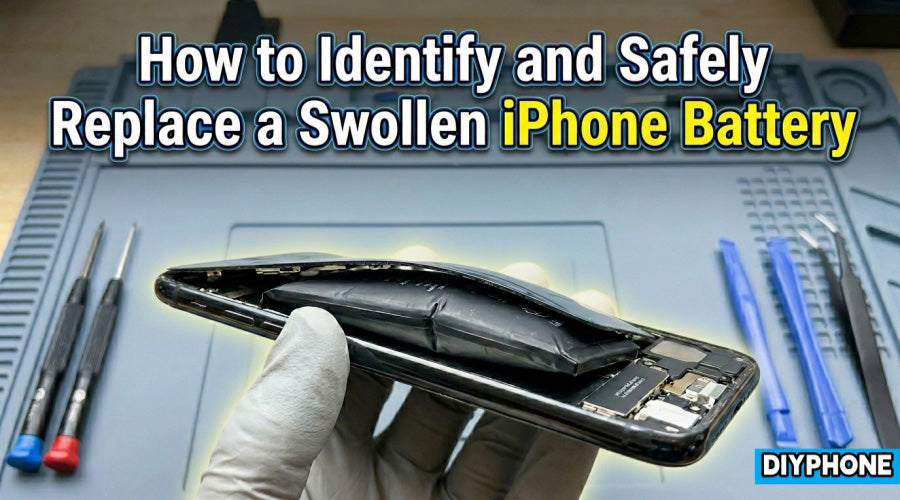
If your iPhone's back panel is lifting, the screen is slightly bulging, or the device no longer sits flat on a table, do not ignore these signs. This is typically a classic symptom of lithium-ion battery swelling. While many users continue using their devices, viewing it as mere cosmetic wear, swelling is actually a signal of a severe internal chemical failure, harboring major safety hazards such as fire or explosion.

I. Phenomena and Causes
1. Battery Swelling
The iPhone series widely utilizes lithium-ion batteries, which store energy through chemical reactions. When a iPhone battery generates gas (such as carbon dioxide or carbon monoxide) due to a malfunction and cannot vent it, the sealed casing expands like a balloon, causing the volume to exceed normal standards.
2. Core Inducing Factors
· Natural Battery Aging: Lithium batteries typically have a lifespan of 2-3 years. As charge-discharge cycles increase, internal resistance rises along with heat accumulation, eventually leading to structural instability.
· High Ambient Temperatures and Poor Heat Dissipation: Charging under bedding, exposure to direct sunlight, or running high-load games can lead to thermal runaway.
· Damage from Non-Original Accessories: Inferior charging heads lack sophisticated current control logic, easily triggering overcharging.
· Physical Compression and Drops: Bending the phone or impact can rupture the internal separator of the battery, causing micro-short circuits.
3. Potential Risks and Safety Warnings
Battery swelling is by no means a simple hardware deformation; it involves multiple risks:
· Physical Structural Destruction
The immense pressure generated by increased battery volume damages components from the inside out:
Screen Cracking: Pressure pushes the LCD module from within, leading to discoloration spots or even shattering.
Mainboard Deformation: Continuous compression may cause precision solder joints on the mainboard to break.
· Extreme Safety Incidents
Fire and Toxic Fumes: Lithium ions react violently with oxygen and moisture in the air, creating high-temperature flames that are difficult to extinguish.
Explosion Risk: When internal pressure reaches a critical point, the casing rupture can lead to an instantaneous release of energy.

II. Mobile Phone Battery Repair
Before performing repairs or disassembly, you must prepare specialized tools and ensure a safe environment.
1. Essential Professional Tool List
· Insulated Anti-Static Tweezers: Used for picking up precision flex cables to avoid short circuits.
· Ceramic Opening Picks / Plastic Pry Bars: It is strictly forbidden to use metal blades in direct contact with a swollen battery.
· Specialized Screwdriver Set: Suited for iPhone Pentalobe screws or Android Phillips screws.
· Battery Adhesive Remover: Used to soften strong battery backing adhesive.
· Reduce Remaining Power: Before repair, discharge the battery to below 10%. The lower the power, the lower the risk of fire.
· Choose a Ventilated Area: Avoid handling old batteries that may produce toxic gases in enclosed spaces.
2. Repair Analysis and Steps
The following is a standardized repair reference process for typical faults caused by battery swelling:
Step 1. Fault Diagnosis: Large gaps in the back cover or a lifted screen; confirm it is physical volume expansion rather than adhesive peeling.
Step 2. Disassembling the Body Screws: Remove the bottom securing screws. Use a YCS Heating pad to heat the phone to approximately 60°C (do not apply localized high heat directly to the swollen area). Use a suction cup and thin picks to slowly create a gap. For swollen batteries, take extra care not to let prying tools puncture the outer aluminum foil packaging.
Step 3. Disconnecting Power: Prioritize disconnecting the battery flex cable from the mainboard. Remove the old battery by locating the pull-tabs of the adhesive at the bottom. If the adhesive strip breaks, drip a small amount of specialized remover under the battery. Once the adhesive softens, push gently with a plastic pry bar; do not use forceful leverage to pry.
Step 4. Cleaning and Installation: Clean residual adhesive from the mid-frame, apply new battery adhesive, install an high-quality replacement battery, and test for any functional abnormalities.

III. Prevention and FAQ
1. Scientific Charging Habits
· Avoid Deep Discharge: Try to charge before the battery drops below 20%.
· Prohibit Overnight Charging: Despite power management chips, maintaining a full charge for long periods accelerates chemical degradation.
· Keep Away from Flammable Media: Do not place a charging phone on pillows or sofas; ensure airflow.
2. Regular Inspection and Maintenance
· Software Health Check: Regularly check the "Battery Health" percentage in the system; consider replacement if it is below 80%.
· Physical Inspection: Users wearing protective cases should remove the case once a month to observe if there is any slight bulging on the back cover.
3. Answers to Common Misconceptions
· Can I prick a swollen battery with a needle to vent the gas?
Absolutely forbidden. Puncturing the casing causes lithium to react violently, instantly erupting into a fireball. It is extremely dangerous.
· Can putting it in the freezer restore it?
Ineffective. Physical deformation is caused by changes in internal chemical structure. Freezing not only fails to fix it but may introduce moisture leading to circuit damage.
· Can a software update solve swelling?
No. Swelling is irreversible hardware damage. Software can only optimize power consumption; it cannot repair physical breakage.
Conclusion
Once battery swelling is confirmed, please power off immediately and send it to a repair center with professional equipment, or purchase professional Mobile repair tools and follow the corresponding model's tutorial. When disposing of old swollen batteries, please place them in dedicated hazardous waste recycling bins; never throw them into regular trash cans. Safety first.


