
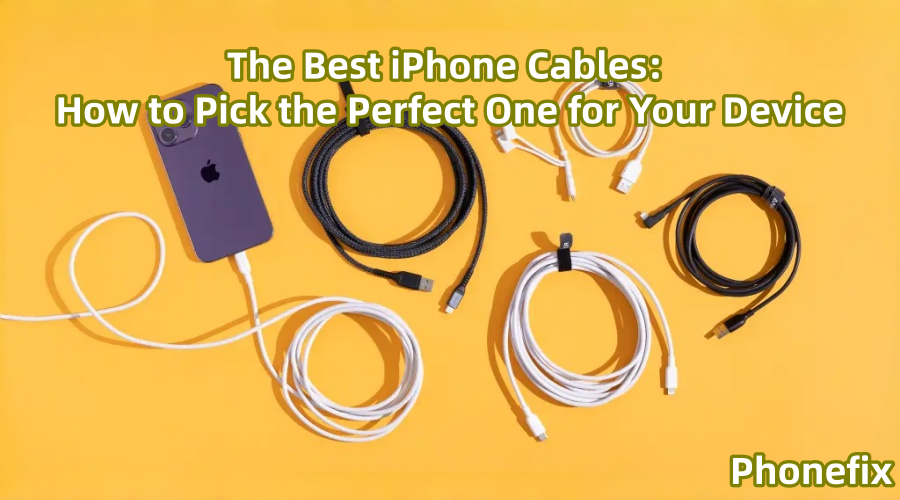
In the contemporary digital environment, the iPhone serves as a work aid, entertainment hub, and photography tool in addition to being a communication tool. Thus, it is crucial to select the appropriate iPhone data cable to guarantee steady and effective charging and data transfer. Phonefix will go into great depth in this post on how to pick the best data cable for your iPhone model, usage requirements, and cable quality.

I. Understanding Different iPhone Charging Port Types
Before choosing an iPhone data cable, it's important to first understand the charging port types used by various iPhone versions. The iPhone's port type has undergone several significant changes; here are some of the main types.
1. Lightning Connector (iPhone 5 - iPhone 14)
Since the iPhone 5, Apple has adopted its own proprietary Lightning connector. This connector is very compact and reversible, making it extremely convenient for users. Apple has continued to use this connector until the iPhone 14 series. Therefore, if you're using an iPhone 5 through iPhone 14, the cable you need should be one with a Lightning connector.
2. USB-C (iPhone 15 series and later)
With the release of the iPhone 15 series, Apple has finally adopted the industry-standard USB-C connector on its devices. This means that starting with the iPhone 15, Apple devices no longer use the Lightning connector for charging and data transfer, but the more universal USB-C connector. If you purchased an iPhone 15 or later, you'll need a USB-C cable for your device.
II. Choosing the Right iPhone Cable Type
After understanding your iPhone model, the next step is choosing the right cable. An iPhone charging cable isn't just a charging tool; it also connects your iPhone to other devices (such as computers and chargers) for data transfer. Therefore, consider the following factors:
1. Port Type: USB-A, USB-C, or Lightning
Different devices may use different connectors. Older computers or power adapters typically use a USB-A port, while newer devices generally use a USB-C port.
· USB-A to Lightning Cable
This is for older devices, such as older computers, car chargers, or some traditional power adapters. If you're using an iPhone 5 through iPhone 14 and your power adapter or computer has a USB-A port, you'll need a USB-A to Lightning cable.

· USB-C to Lightning Cable
If your power adapter or computer has a USB-C port (such as a newer MacBook or a recent charging adapter), you'll need a USB-C to Lightning cable. This cable not only supports charging but also offers faster data transfer speeds.
· USB-C to USB-C Cable
For iPhone 15 series and later, you'll need a USB-C to USB-C cable. Many modern computers and power adapters already support USB-C, and this cable offers the advantages of faster charging and more efficient data transfer.
2. Data Transfer Speed: Charging vs. Data Transfer
Besides charging capabilities, data transfer speed is also a key consideration when choosing a data cable. If you frequently connect your iPhone to a computer to transfer files, especially photos, videos, or backups, efficient data transfer capabilities are essential.
· Lightning port transfer speed: For devices from iPhone 5 to iPhone 14, the maximum supported data transfer speed is USB 2.0 (approximately 480 Mbps). If you have an older iPhone, make sure your cable supports this.
· USB-C transfer speed: Starting with the iPhone 15, Apple adopted the USB-C charging port, which significantly improves data transfer speeds. The iPhone 15 Pro and iPhone 16 Pro series support USB 3.0 data transfer, with speeds of up to 5Gbps. If you prefer even higher transfer speeds, make sure to choose a cable that supports USB 3.0 or higher.

3. Fast Charging Support
With the increasing popularity of fast charging technology, many users are looking for efficient charging methods to reduce device charging time. For iPhone 8 and later, you can achieve this by combining a fast power adapter with a cable that supports fast charging.
· USB-C to Lightning Cable: If your device supports fast charging (such as iPhone 8 and later), you'll need a power adapter that supports the Power Delivery (PD) protocol, along with a USB-C to Lightning cable. This combination provides faster charging, typically charging to 50% in 30 minutes.
· USB-C to USB-C Cable: If you have an iPhone 15 series or later, the USB-C port natively supports fast charging. Paired with an iPhone power adapter that complies with the Power Delivery standard, the cable can charge your device in even less time.
III. Choose a High-Quality iPhone Cable
Choosing a high-quality iPhone cable isn't just about performance; safety is equally important. Here are some tips for choosing a high-quality data cable:
1. Brand Selection
While there are many third-party brands offering iPhone cables, Apple's official Lightning cables are generally the safest and most stable choice. Apple's official cables are made of high-quality materials, ensuring stable data transmission and safe charging. Among third-party brands, Anker, UGREEN, and Phonefix are highly regarded and offer reliable cables.

2. Durability
iPhone cables are frequently used iPhone accessories, especially during daily charging and data transfer, subjecting them to bending, stretching, and external forces. Choosing a durable cable is crucial. High-quality cables typically use tougher outer materials, such as braided nylon or TPE (thermoplastic elastomer), which effectively prevent breakage and fraying.
3. MFi Certification
"MFi" (Made for iPhone/iPad) is Apple's certification mark for compatible accessories. When purchasing, it's recommended to choose cables with MFi certification. The MFi certification mark means the cable has undergone Apple's quality testing, ensuring stable operation with iPhone devices and no damage to the device during charging or data transfer.
IV. How to Maintain and Extend the Life of Your Cable
Although iPhone cables are consumable, some simple maintenance measures can effectively extend their lifespan:
1. Avoid Excessive Bending: The connectors of cables are particularly susceptible to damage. Avoid frequent bending, especially when plugging and unplugging devices. Store the cable neatly during use to prevent dragging or pulling.
2. Use a Protective Cable Cover: There are many protective covers available for cable connectors that effectively reduce wear and tear on the connectors, extending the life of the cable.
3. Clean the connectors regularly: Clean the cable and device connectors to prevent dust or debris from clogging the connectors, which can affect charging and data transfer.
For optimal data transmission speeds, charging effectiveness, and device security, selecting the appropriate iPhone cable is essential. Data cables from the official China Phonefix website will keep your iPhone operating more securely and efficiently, regardless of whether you have an iPhone 17 or later or are using an earlier model. We hope that this article's tips will assist you in selecting the best iPhone data cable for a seamless data transfer and charging experience.


