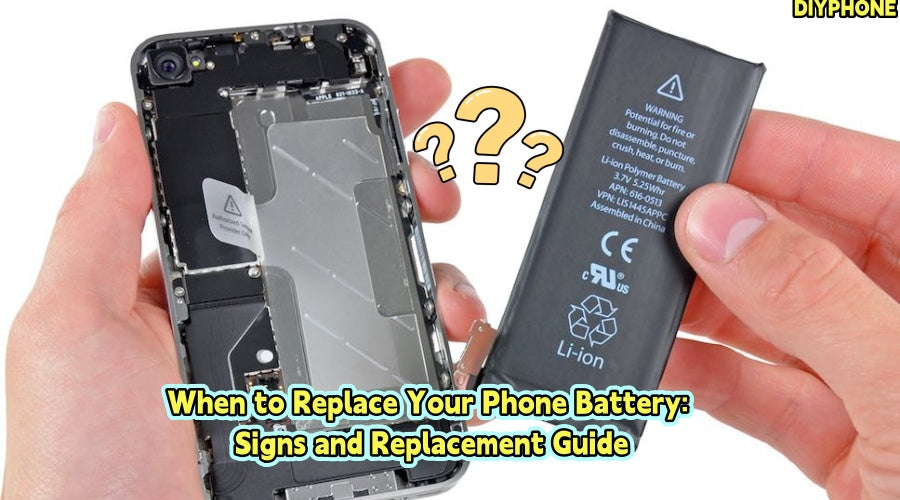
Smartphones have become indispensable devices in everyday life. However, as usage time increases, phone batteries can develop various problems. Many users are unsure when a battery needs to be replaced and may overlook early warning signs of battery failure. This article introduces how phone batteries work, why they age, the common signs of battery deterioration, and how to replace them, helping users determine whether they need a new battery.

I. How Smartphone Batteries Work
Currently, most smartphones use lithium-ion batteries. These batteries offer advantages such as high energy density, light weight, and rechargeability. They can store power within the limited space of a phone's body and provide a stable power supply for the device.
1. Basic Battery Components
Phone batteries, such as iPhone Battery, are generally lithium-ion batteries. A lithium-ion battery mainly consists of four components:
· Cathode: Usually made of lithium-containing metal oxide materials, responsible for storing and releasing lithium ions.
· Anode: Usually made of graphite, used to store lithium ions.
· Electrolyte: Provides a medium for lithium ions to move between the cathode and anode.
· Separator: Separates the cathode and anode to prevent direct contact that could cause a short circuit.
2. Charging and Discharging Principles
When a phone is discharging, lithium ions move from the anode to the cathode, generating an electric current through the external circuit to power components such as the screen and processor. When a charger is connected, lithium ions move back to the anode, storing electrical energy. However, this process cannot be repeated indefinitely. As the number of charging and discharging cycles increases, the materials inside the battery gradually change, resulting in reduced storage capacity and power delivery capability.
II. Battery Aging and Its Impact on Performance
Battery health reflects the relationship between the current maximum storage capacity and the battery's original capacity when it left the factory. As usage time increases, chemical degradation and increased internal resistance occur inside the battery, gradually reducing its actual battery life.

1. Battery Health and Capacity Loss
After hundreds of charging cycles, the maximum capacity of a lithium-ion battery may gradually decrease to around 80% of its original capacity. The actual rate of degradation depends on battery design, usage environment, and charging habits. When battery health declines, even if the phone indicates a full charge, the actual usage time may be significantly reduced.
2. How Battery Aging Affects Phone Performance
Battery aging affects not only battery life but also the overall operation of the phone. Common symptoms include:
· Shorter battery life, requiring more frequent charging.
· Unstable power delivery, causing the device to shut down unexpectedly.
· Some phones may limit peak performance due to insufficient power delivery capability.
· Increased internal battery resistance may cause abnormal heating during charging and discharging.
3. Common Factors That Accelerate Battery Degradation
Prolonged exposure to high temperatures, such as direct sunlight or a hot car interior. Frequently allowing the phone battery to drain completely until the device shuts down automatically. Keeping the battery fully charged or at an extremely low charge level for extended periods. Using low-quality chargers and charging cables that do not meet quality standards.
III. Common Signs of Battery Aging
Understanding the signs of battery aging can help users identify problems in a timely manner and prevent further issues from affecting phone usage.
1. Battery Swelling and Physical Abnormalities
If the back cover or screen of a phone becomes raised, gaps appear along the edges of the device, or the battery area becomes unusually hot, these may indicate a battery problem. Among these issues, battery swelling is a relatively serious safety hazard. Once detected, stop using and charging the phone immediately. Do not press, disassemble, or attempt to handle the battery yourself. Contact a professional repair technician as soon as possible.
2. Rapid Battery Drain and Charging Abnormalities
Declining battery performance may also appear in the following ways:
· Rapid battery drain: The battery level drops noticeably even when no demanding applications are running.
· Abnormal charging: Charging speeds become unstable, or the battery fails to gain charge normally over an extended period.
· Frequent shutdowns: The phone suddenly turns off while there is still some battery power remaining.
· Shorter battery life: The phone could previously last an entire day, but now needs to be charged after just a few hours.
If these problems persist, first check the charger, charging port, and background applications. After ruling out other possible causes, determine whether the issue is related to battery failure.

3. Battery Health and When to Replace the Battery
Some smartphones support checking battery health or maximum capacity through the system settings. When the battery's maximum capacity falls below 80% of its original capacity and noticeable battery life problems have already appeared, replacing the battery is generally worth considering. However, 80% is not an absolute standard. If the battery can still meet daily needs, you can continue monitoring its condition. If swelling, deformation, or similar problems occur, stop using the device immediately and seek professional assistance.
IV. Smartphone Battery Replacement Guide
When battery aging significantly affects daily use, replacing the battery is usually more economical than purchasing a new phone directly. Users can choose an appropriate repair method based on their device condition and budget.
1. Common Battery Replacement Methods
· Official after-sales service: Batteries that meet the manufacturer's specifications are generally used, and the repair process and quality assurance are relatively comprehensive.
· Third-party repair services: Prices may be more flexible, but users should pay attention to the battery source, repair expertise, and after-sales support.
· DIY replacement:This can save labor costs, but improper disassembly may damage the screen, flex cables, or other components.
For users without repair experience, official after-sales service or reputable professional repair centers are recommended.
2. Basic Steps for Battery Replacement
Professional repair technicians usually follow the process below:
Step 1. Inspect the Device: Confirm the battery's health condition and check whether the phone has any other faults.
Step 2. Power Off the Phone: Turn off the device and prepare it for repair.
Step 3. Remove the Old Battery: Use a Screen Heating Separator to heat the screen, open the phone's body, disconnect the battery, and safely remove the old battery.
Step 4. Install the New Battery: Select a battery that meets the device specifications, connect it correctly, and secure it in place.
Step 5. Test the Functions: Check whether the phone powers on, charges, and performs its basic functions normally.
The internal structure of modern smartphones is relatively sophisticated, and some batteries are secured with strong adhesive. Users without experience are not advised to disassemble their devices themselves. In particular, swollen batteries must never be pried open or squeezed.
3. Choosing a New Battery and Important Considerations
When replacing a battery, users should not focus solely on price. They should also consider battery quality, model compatibility, warranty coverage, and the expertise of the repair service provider. Old batteries should also be handed over to professional recycling services rather than discarded carelessly.

V. FAQ
1. Does a phone battery have to be replaced when its health drops below 80%?
Not necessarily. 80% is a commonly used reference point. If the phone's battery life still meets daily needs and there are no other abnormalities, users can continue monitoring it. If battery degradation has already significantly affected usage, replacement is recommended.
2. How long does a phone battery usually last?
Battery lifespan depends on usage frequency, the number of charging cycles, temperature conditions, and battery quality. Different brands and models may vary, so the actual battery health should be considered when making a judgment.
3. Will phone performance return to normal after replacing the battery?
If problems such as shorter battery life and unexpected shutdowns are mainly caused by an aging battery, replacing it can generally improve power delivery stability and the overall user experience. However, other hardware or system problems may not be resolved by battery replacement.
4. How can I extend the lifespan of a new battery?
It is recommended to avoid high-temperature environments, avoid frequently draining the battery completely, use qualified charging accessories, and set a reasonable charging limit according to the phone's supported features.
Summary
Phone battery aging is an inevitable issue during long-term use. However, adopting proper charging habits, avoiding high-temperature environments, and regularly checking battery health can help slow down battery degradation to some extent. Choosing Reliable Phone Accessories and professional repair services can improve battery life and extend the overall lifespan of the device.