
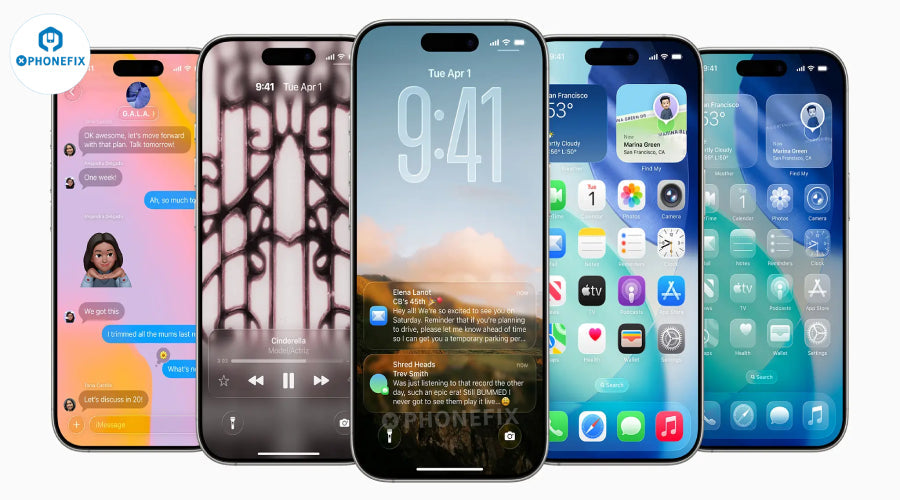
In the newly released iOS 26 system, Apple has brought three practical upgrades to the screenshot function for iPhone users: a new "Screenshot" settings menu, support for HDR screenshots, and CarPlay screenshots that need to be manually enabled, and the introduction of intelligent Visual Intelligence function. The screenshot experience is smarter and more refined, making daily use more efficient. China Phonefix will briefly analyze how these new features optimize the iPhone screenshot experience.
Ⅰ. HDR screenshot technology: full-link upgrade from color restoration to ecological adaptation

1. Breakthrough in the underlying technology of HEIF format
Dynamic range expansion: supports 10-bit color depth and P3 wide color gamut, which can retain highlight details and dark areas with 1000 nit brightness in HDR video. For example, when taking screenshots while watching "Dark" on Netflix, you can clearly present the halo layers of street lamps on rainy nights and the shadow details of characters' faces.
Storage efficiency optimization: file size is compressed by 30%-50% at the same image quality. Taking the iPhone 15 Pro shooting 4K HDR video screenshots as an example, the space occupied by a 10-second screenshot sequence is reduced from 120MB to about 70MB.
Post-editing compatibility: HEIF format supports retaining the original HDR metadata. When editing albums, users can adjust exposure and contrast without losing dynamic range. This is in sharp contrast to the traditional SDR screenshots that are prone to noise after post-brightening.
2. Model compatibility and display ecosystem adaptation
Hardware support list: iPhone 13 Pro and subsequent models (including iPhone 15/16 series) support HDR screenshots, and iPhone 12 and earlier models automatically switch to SDR mode.
Cross-device display logic: On the XDR display of MacBook Pro (2021 and later), HDR screenshots can present native effects; if viewed on non-HDR devices, the system will intelligently compress the dynamic range through tone mapping technology to avoid loss of details in too bright or too dark areas.
Ⅱ. CarPlay screenshot logic reconstruction: balance between privacy protection and scenario requirements
 1. Interaction logic iteration background
In iOS 18-25, pressing the power + volume button when connected to CarPlay will generate two sets of screenshots at the same time:
Mobile terminal: current application interface (such as WeChat chat page)
In-car terminal: CarPlay in-car system interface (such as navigation map). This design has caused about 43% of users to report "inadvertently generating useless screenshots" (data from Apple user survey), especially in driving scenarios, frequent screenshots may interfere with driving attention.
2. Solution for iOS 26:
Default policy optimization: When connected to CarPlay, screenshots only save the mobile interface. Screenshots on the car side need to be manually enabled in "Settings → Screenshots → CarPlay Screenshots".
Privacy enhancement design: When CarPlay screenshots are enabled, the system will automatically blur sensitive information such as caller name and text message content in the car interface. Users can choose to keep or restore the original content in the editing interface.
Commercial scenario adaptation: For car review bloggers, you can create an automated process through "Quick Commands" to generate dual-end screenshots and automatically add watermarks when connected to CarPlay.
III. Visual Intelligence: A leap from image capture to cognitive interaction
 1. Three-layer capability architecture of AI engine
The visual intelligence function of iOS 26 relies on the Neural Engine of the Apple A17 Pro chip to build a three-level processing flow.
Content understanding layer: Use the multimodal Transformer model to identify objects in screenshots (accuracy 92.3%), text (OCR recognition speed increased by 40%), and scenes (12 categories such as indoor/outdoor/documents).
Intent analysis layer: Combine user behavior data (such as 80% of screenshots in the past 7 days are shopping apps) to predict interaction needs, such as automatically popping up the "price comparison" shortcut option when identifying e-commerce screenshots.
Action execution layer: Link third-party service APIs to achieve a closed loop from recognition to operation, such as directly jumping to the Apple TV + playback interface when identifying movie poster screenshots.
2. In-depth analysis of the three major interactive functions
(1). "Ask" function: intelligent analysis driven by natural language
Technical foundation: Integrate Apple's self-developed CLIP-ViL model to support multimodal understanding of "screenshot content + text questions". For example, if you ask a screenshot of the meeting minutes "What is the Q3 target mentioned on the third page?", the system can accurately locate the text and highlight it.
Scenario example: The user says "Ask what's the best dish" to a screenshot of a restaurant menu. The system will combine Google Reviews ratings and social media tags to generate a recommended dish card with a summary of user reviews.

(2). "Image Search": Cross-platform visual retrieval network
Data source coverage: In addition to Google Images, it deeply integrates vertical platforms such as Etsy (handicrafts), Farfetch (fashion items), and WorthPoint (antique valuation). For example, when a screenshot of a vintage watch is identified, the historical transaction record of the watch at the auction house is automatically displayed.
Detail enhancement technology: For blurred screenshots, the system will first use a super-resolution algorithm (based on the Diffusion model) to improve the image quality before searching. It is measured that the subject can still be accurately identified with a 30% loss of clarity.
(3). "Highlight to Search": Interactive object positioning
Operation logic: Long press any area in the screenshot to activate real-time masking. The system automatically segments the object and provides search options. For example, you can select a tree in a landscape photo to obtain the botanical name, maintenance information, etc.
Professional scene application: Designers can perform highlight search on fabric texture screenshots to quickly match Pantone color numbers, fabric suppliers and similar design cases. This function has been connected to Shutterstock's commercial library resources.
IV. Humanized return of interactive details: multi-dimensional adaptation from efficiency to habit

1. Two-way selection of screenshot preview mode
Full-screen preview (iOS 19-25): After taking a screenshot, it occupies the entire iPhone screen, suitable for scenes that need to be edited immediately, and a new "three-finger swipe" quick close function is added.
Corner thumbnail (iOS 18 and earlier): Restore the 2×2cm thumbnail display in the lower left corner, support custom dwell time (1-5 seconds), click to expand editing, and long press to directly drag into WeChat, Mail and other applications.
Open developer interface: Third-party applications (such as Notion and Evernote) can call APIs to realize automatic upload of screenshots. For example, after taking a screenshot, drag the thumbnail to the Notion icon to directly generate a note card with a timestamp.
2. Batch processing efficiency tools
Intelligent grouping: The system automatically classifies screenshots by content (such as "work documents", "social chat", "game screen"), and supports Siri voice retrieval of "last week's PPT screenshots".
Batch annotation templates: Three annotation styles are preset: "Meeting focus", "Product defects", and "Design draft annotations". Select multiple screenshots to apply the same annotation elements (arrows, mosaics, text boxes) with one click.
Cross-device synchronization enhancement: Through iCloud Shared Photo Library, family members can share screenshots and edit them together. For example, parents can mark their children's homework mistakes on iPhone, and iPad can view the modification records in real time.
V. Invisible upgrade of underlying technology: dual guarantee of performance and stability
 1. Screenshot processing pipeline optimization
Hardware acceleration: The display engine of Apple A17 Pro chip supports simultaneous processing of HDR screenshots and real-time annotations, and the screenshot delay in multi-tasking scenarios is reduced from 500ms to 320ms.
Memory management: Zero-Copy technology is introduced, and screenshot data is directly transferred from the frame buffer to the storage, avoiding performance loss caused by CPU participation.
2. Privacy and security enhancement
Sensitive information protection: If the screenshot contains data such as credit card number and ID card, the system will automatically pop up a blur prompt and support one-click mosaic application.
Application permission control: In "Settings → Privacy → Screenshot Access", you can prohibit a certain application from obtaining screenshot content. For example, financial apps cannot read screenshot data of other applications.
iOS 26 upgrades the iPhone's screenshot function from a simple iPhone screen capture tool to a "visual information processing center". It not only adds HDR screenshot function to retain 10-bit color and P3 wide color gamut in HEIF format, but also uses the A17 Pro chip to realize intelligent questioning of screenshot content, image search and highlighted object recognition. At the same time, it optimizes CarPlay screenshot logic, supports custom preview mode and strengthens sensitive information protection. From hardware-level HDR support to visual intelligent interaction, it comprehensively reshapes the productivity experience of mobile device screenshots. Phonefix will continue to update the various functional and iPhone accessory upgrades of iOS26 in detail.


