
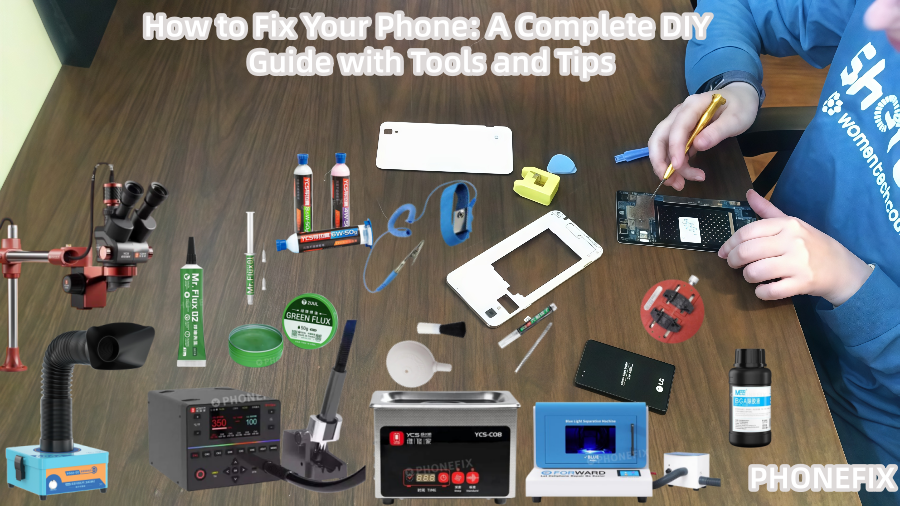
Mobile phones are indispensable devices in our everyday lives, yet they frequently suffer from problems like broken screens, weak batteries, or broken charging connections. While some problems can be costly and time-consuming to correct properly, many common problems are simple DIY tasks. Phonefix will show you how to fix your phone yourself, saving money and honing your abilities, using the appropriate materials and methods.
I. Tools Required for Mobile Phone Repairs
Before performing a DIY mobile phone repair, it's important to first prepare the appropriate tools. Using professional tools will make the disassembly process smoother and prevent damage to the phone's components. Depending on the difficulty of the repair, the tools required are categorized into basic and advanced tools.
1. Basic Tools
a. Precision Screwdriver Set
A precision screwdriver is one of the most essential tools for disassembling a mobile phone. Because a phone contains many tiny screws of varying sizes, a precision screwdriver set provides a variety of screwdriver bits to easily remove the phone's casing, screen, and other components.

b. Prybars and Plastic Picks
Prybars are essential tools for disassembling a mobile phone. Typically made of plastic or metal, this tool helps you easily open the phone's case and avoid damaging internal components. Spudgers come in a variety of shapes, suitable for different removal needs. Be gentle when using them, and avoid applying excessive force to avoid damaging the screen or logic board.
c. Suction Cup Tool
A suction cup is an essential tool for screen removal. It attaches to the phone's screen through suction, effectively separating it from the body and preventing cracks. For most phones, a suction cup tool simplifies the removal process and is essential for screen replacements.
d. Anti-static Mat and Wrist Strap
The circuit boards inside your phone are extremely sensitive, and static electricity can cause irreparable damage. Therefore, an anti-static mat and wrist strap are essential. The anti-static mat provides an anti-static work environment, while the wrist strap directs static electricity to the ground, protecting your phone from damage.
e. Tweezers
Tweezers are a handy tool for handling small parts, especially when replacing batteries, screens, or other small components, where delicate handling is crucial. Tweezers help you grasp tiny screws or connectors, ensuring that phone components are installed without interference.

2. Advanced Tools
a. BGA Soldering Station
A BGA Soldering station is primarily used for working with components on circuit boards, such as replacing connectors, buttons, or repairing solder joints. If your phone needs to replace a battery connector or repair a faulty motherboard, a soldering station is essential.
b. Hot Air Gun
A hot air gun is used to soften adhesives, glue, or desolder components on circuit boards. When replacing a screen, a hot air gun effectively softens the glue between the screen and the phone body, making the disassembly process smoother.
c. Digital Multimeter
A digital multimeter is a valuable aid in troubleshooting, especially if the battery won't charge or the phone won't turn on. It can measure battery voltage, current, and resistance, helping you pinpoint the problem and facilitating further repairs.
d. USB Port Tester
If your phone isn't charging properly or won't connect to a computer, a USB port tester can help diagnose the problem. It can detect damage to the USB port, ensuring you can pinpoint the problem.

II. Common Phone Repairs and Required Tools
By understanding the tools you need, you can choose the appropriate tools for your specific phone problem. Below are several common phone repair methods and the tools required.
1. Screen Replacement
A cracked or distorted screen is one of the most common phone problems. Screen replacement typically requires the following tools:
· Precision screwdriver: Removes the back cover and screen frame.
· Suction tool: Helps remove the screen safely and avoids damage.
· Spudger: Helps easily break the adhesive between the screen and the phone.
· Hot air gun: Softens the adhesive, making screen removal easier.
2. Battery Replacement
A degraded or swollen battery is also a common problem for many users. When replacing the battery, ensure you have the appropriate tools to disassemble the phone and replace it. Required tools include:
· Precision screwdriver: Removes the battery cover and other mounting components.
· Spudger and suction tool: Removes the back cover or screen.
· Tweezers: For delicate handling of the battery connector.
3. Charging Port Repair
If a phone's charging port is damaged, it's usually necessary to disassemble the phone and replace the charging port assembly. Repairing a charging port typically requires the following:
· Precision screwdriver: To remove the housing and port.
· BGA Soldering station: Soldering may be necessary when replacing damaged port components.
· Tweezers: To assist in delicately installing the new charging port.
4. Water Damage Repair
Water damage is a common problem for phones, especially after a drop. If your phone has been submerged in water, we recommend the following steps for repair:
· Power off the phone and remove the battery as soon as possible.
· Disassemble the phone and clean the logic board and other damaged components with isopropyl alcohol.
· Clean the logic board with an ultrasonic cleaner to remove water stains and debris.
· Dry the phone and check if it powers on normally.

III. DIY Repair Tips and Precautions
In addition to having the right tools, the following tips and precautions are also crucial when performing DIY phone repairs:
· Disassemble carefully: Be gentle and avoid applying excessive force, especially when prying off the screen or removing the battery.
· Document your steps: Before each disassembly, take photos or mark the parts to keep track of their position and order. This will make reassembly smoother.
· Use ESD protection: Static electricity can damage your phone's motherboard. Remember to wear an anti-static wrist strap and use an anti-static mat.
· Test functionality: After each repair, be sure to test your phone's functionality to ensure it's working properly.
DIY phone repairs not only save you money but also help you gain experience and improve your skills. From replacing screens and batteries to repairing charging ports, mastering basic phone repair skills is incredibly valuable. With the right tools and techniques, many common problems can be easily solved.
You can always take your phone to a professional repair shop if the issue is complicated or you're not sure how to fix it. DIY fixes, on the other hand, not only save money but also help you learn how to fix minor problems and have a deeper understanding of the internal workings of the phone. Visit China Phonefix to find professional phone repair tools. It is our goal that this tutorial will assist you in beginning your phone repair adventure!


