
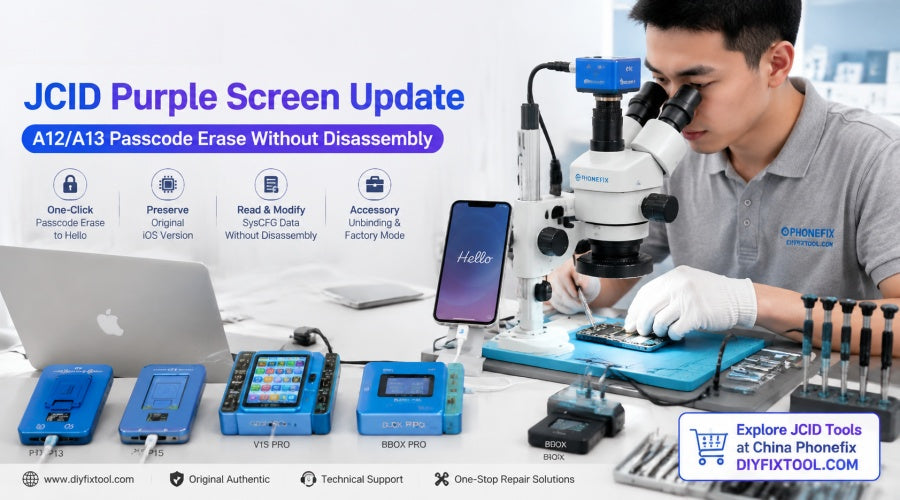
JCID has officially released a major upgrade to its purple screen tool, adding support for one-click password erasure on A12/A13 devices while retaining the original system version, and further optimizing the purple screen repair function for A7–A11 devices. This article will comprehensively analyze the content of this update and its practical application in iPhone repair.

I. Core Upgrade: A12/A13 Chip Passcode to Hello Interface
For iOS devices with screen locks (passcodes) or in a disabled state, repair personnel previously could only erase the device by performing a forced reset without the original password. However, resetting is not only time-consuming and prone to errors due to firmware verification failures, but it also forces the device's iOS system to the latest version, which can easily cause lag on older models or render certain unlocking schemes ineffective. This JCID update brings revolutionary solutions to devices using A12 and A13 chips (also covering classic A7–A11 devices):
1. One-click erase and restore, no flashing required: After connecting the device using JCID's professional tools, user data and screen lock can be wiped with a single click, directly returning the device to the "Hello" activation screen.
2. Perfect preservation of the original system version: No need to download bulky official firmware, avoiding various unknown errors caused by upgrades or downgrades, greatly preserving the stability of the original system and the value of special versions.
3. Read and modify underlying (SysCFG) data without disassembly: Underlying data can be read and modified without the high-risk hard drive removal (unbinding/freeing Nand Chip) from the motherboard.
4. Factory mode and accessory unbinding: Supports querying and unbinding data for cameras, batteries, and other accessories without disassembly, as well as repairing specific abnormal states without flashing.
II. Supported Device Models and Chip Architecture Comparison Table
According to the latest compatibility list released by JCID, this upgrade covers a wide range of models, from classic older models to mainstream models:
| Device Type | Chip Architecture | Supported Models | Key Features |
| iPhone | A12 / A13 (NEW) |
iPhone 11 Pro Max, 11 Pro, 11 iPhone XR, XS Max, XS iPhone SE 2 (2020) |
Passcode to Hello screen, retains iOS version, non-disassembly SysCFG data modification, accessory unbinding |
| iPhone | A7 – A11 |
iPhone X, 8, 8 Plus, 7, 7 Plus iPhone 6s/6sP, 6/6P, SE |
Purple mode without disassembly, SysCFG data modification, one-key data wipe |
| iPad | A12 / A13 (NEW) |
iPad 8 (10.2"), iPad 9 (10.2") iPad Air 3 (10.5") |
Passcode to Hello screen, retains iOS version, non-disassembly purple screen data repair |
| iPad | A7 – A11 |
iPad Pro series (12.9" Gen 1/2, 10.5", 9.7") iPad Air 1/2, iPad Mini 2/3/4/5 iPad 5 / 6 / 7 |
Non-disassembly SysCFG modification, Wi-Fi/Bluetooth unbinding, etc. |
| iPod | A8 / A10 | iPod Touch 6, iPod Touch 7 | One-key purple mode entry and data editing |
III. JCID Hardware Ecosystem Multi-Platform Integration: Overview of Compatible Main Control Devices
To allow repair personnel in different usage scenarios to easily enjoy the technological benefits brought by this upgrade, JCID has deployed this function across its flagship main control devices and expansion boxes. Whether you prefer standalone offline operation or use professional computer software, you can find compatible hardware at Phonefix:
1. JCID V1S PRO & V1S PLUS Smart Programmer: As the "all-rounder" of the JCID family, the V1S PRO and V1S PLUS, after connecting to the corresponding purple screen expansion module (such as the P13/P15 expansion dock), can directly complete automated detection and one-click erasure operations on the main control screen. The interface is intuitive and suitable for high-intensity professional repair shops.
2. JCID P13 & P15 Hard Drive/Purple Screen Repair Stand: A standalone tool designed for reading and writing BGA80/BGA110 hard drives and repairing purple screens without disassembly. This update enhances its support for A12/A13 repair logic without disassembly.
3. JC B-BOX PRO Purple Screen Box / B-BOX: As a dedicated tool for one-click entry into purple screen mode, the BBOX PRO features a high-definition display that shows real-time BOX port connection status, iOS device current mode, and key parameters such as charging current and voltage. It's a highly cost-effective and frequently used repair tool.

IV. Core Recommended Tools and Beginner's Guide
For engineers with limited budgets or those needing to build a basic iOS purple screen repair stand, China Phonefix has specially launched several highly cost-effective tools on diyfixtool.com:
1. JC B-BOX Window DCSD Cable
· Product Features: Optimized for Windows system environments, integrating a traditional DCSD data cable with one-click DFU/purple screen boot logic. This tool enables repair technicians to quickly enter purple screen mode on devices without disassembling them, allowing for the reading and rewriting of underlying SysCFG data.
2. JC B-BOX C3 DFU Black Tool One Key to Purple Mode
· Product Features: Classic "C3 Black Box" design with extremely high stability and burn-out protection circuitry. Supports one-click flashing of purple screen mode onto all A7–A11 series iPhones and iPads, eliminating the tedious and often unsuccessful process of manually pressing buttons to enter DFU mode.
JCID A12/A13 upgrades to non-disassembly purple screen and Passcode erasure technology provide a more efficient and secure solution for iOS device repair, data recovery, and used device disposal. Phonefix is committed to providing repair engineers worldwide with genuine tools, technical support, and industry information. For more detailed information on V1S PRO, BBOX PRO, P15, and the purple screen engineering cable, please visit the official website diyfixtool.com.


